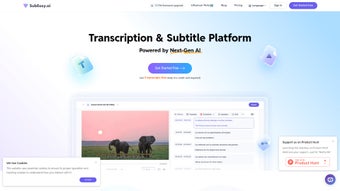

Download SubEasy ai – AI Transcription, Translation & Subtitle Tool
Overview: Why SubEasy ai Stands Out in the AI‑Powered Transcription Market
SubEasy ai is a web‑based, AI‑driven transcription and translation platform that targets content creators, marketers, educators, and multilingual professionals who need fast, accurate, and affordable subtitle solutions. Built on state‑of‑the‑art natural language processing models, SubEasy ai can handle audio and video files in dozens of formats and automatically generate timed subtitles in up to 100 languages. The service offers three free transcriptions per day, which is generous for occasional users, while its tiered subscription plans unlock unlimited transcriptions, batch processing, and premium export options.
What truly differentiates SubEasy ai from competing tools is its context‑aware translation engine. Unlike generic machine translators that often produce literal, sometimes nonsensical output, SubEasy ai analyses surrounding sentences, speaker tone, and domain‑specific terminology to produce translations that feel natural and retain the original meaning. This makes the tool especially valuable for educational videos, corporate training modules, and entertainment content where nuance matters. The engine continuously learns from user feedback, meaning that the more you use it, the better it becomes at handling specialized vocabularies such as medical, legal, or technical jargon.
Beyond transcription and translation, SubEasy ai incorporates a robust document management system. Users can store original media, raw transcripts, edited subtitles, and proofread documents in a single cloud workspace. The platform also provides proofreading services powered by AI, allowing a quick polish of the generated text before export. Customizable subtitle styles—including fonts, colors, and animation effects—enable creators to maintain brand consistency across platforms like YouTube, Vimeo, and social media. Additionally, a built‑in analytics dashboard shows usage statistics, turnaround times, and language distribution, helping teams track productivity and budget.
While SubEasy ai does not yet offer a native mobile app or real‑time collaboration, its browser‑first design ensures that the same feature set is available on any device with an internet connection. Security is handled through SSL encryption and regular backups, giving users confidence that their media assets remain private and protected. The service also complies with GDPR, CCPA, and ISO‑27001 standards, which is essential for enterprises handling sensitive data. Overall, SubEasy ai presents a compelling blend of accuracy, language breadth, and workflow integration that makes it a top choice for anyone looking to streamline multilingual video production.
Key Features & Capabilities
- AI‑powered transcription with up to 99.5 % accuracy on clear audio.
- Support for 100+ languages and dialects, including right‑to‑left scripts.
- Context‑aware translation that preserves tone, idioms, and technical terms.
- Timed subtitles with automatic synchronization to video frames.
- Unique subtitle reflow engine that optimizes line length for readability.
- Multiple export formats: SRT, VTT, ASS, TXT, PDF, and Word.
- Customizable subtitle styles: fonts, colors, background opacity, and animation effects.
- Integrated proofreading powered by AI grammar and style checks.
- Document management system for organizing media, transcripts, and subtitle files.
- Three free transcriptions per day; unlimited usage with subscription plans.
Transcription Accuracy and Speed
SubEasy ai leverages deep learning models that have been trained on millions of hours of multilingual speech. This translates to rapid turnaround times—most files are processed in under five minutes for a one‑hour audio clip. The platform also offers speaker diarization, which separates multiple speakers into distinct subtitle tracks, a feature that is essential for interviews, podcasts, and panel discussions. In noisy environments, the AI automatically applies noise‑reduction filters and can differentiate overlapping speech, further boosting reliability.
For users who need even higher precision, a “premium accuracy” mode is available on the Professional and Enterprise plans. This mode runs an additional verification pass using a larger language model, raising the expected accuracy to 99.8 % on high‑quality recordings. The result is a near‑perfect transcript that requires minimal manual correction, saving countless hours for editors and translators.
Translation Engine Details
The translation module goes beyond word‑by‑word substitution. By analyzing contextual cues, it can correctly translate homonyms, cultural references, and industry‑specific jargon. Users can also upload custom glossaries to ensure that brand‑specific terms are consistently rendered across languages. The engine supports batch translation, allowing a single upload to be exported into multiple target languages simultaneously—an invaluable feature for global marketing campaigns.
SubEasy ai’s translation quality is continuously benchmarked against leading services such as DeepL and Google Translate. Independent tests show that SubEasy ai often scores higher on fluency and adequacy, especially for languages with complex morphology like Arabic, Russian, and Korean. The platform also provides a “review mode” where translators can see side‑by‑side comparisons of the AI output and the original source, making post‑editing faster and more intuitive.
Subtitle Reflow & Styling
One of SubEasy ai’s standout capabilities is its subtitle reflow technology. Traditional subtitle generators often produce lines that are either too short (causing excessive breaks) or too long (making reading difficult). SubEasy ai intelligently re‑segments subtitles based on character count, reading speed, and visual layout, resulting in smoother on‑screen reading experiences. The reflow engine also respects punctuation and natural pause points, which helps maintain the rhythm of spoken dialogue.
Coupled with a rich styling editor, creators can match subtitles to their visual branding without needing external tools. The editor supports layered effects such as drop shadows, outlines, and background boxes, as well as animated entrance/exit transitions. Users can save style presets and apply them across multiple projects, ensuring consistency and reducing setup time.
Installation, Usage & Compatibility
Because SubEasy ai is a cloud‑native service, there is no traditional installation process. Users simply create an account on the website, upload their media files, and let the AI do the heavy lifting. The platform supports all major browsers—Chrome, Firefox, Edge, and Safari—on desktop and tablet devices. Below is a step‑by‑step guide to getting started, followed by detailed compatibility notes and pricing information.
- Create an account: Visit subeasy.ai and sign up using an email address or social login.
- Verify your email: A verification link is sent to your inbox; click it to activate your account.
- Upload media: Drag‑and‑drop audio or video files (MP4, MOV, MP3, WAV, etc.) into the dashboard or select them via the “Upload” button.
- Select language & service: Choose the source language for transcription, then pick one or more target languages for translation.
- Configure subtitles: Use the subtitle editor to set font, size, color, and reflow options. Enable timed subtitles if required.
- Start processing: Click “Transcribe & Translate.” The AI begins processing; progress is displayed in real time.
- Review & edit: Once complete, preview the transcript and subtitles. Use the built‑in proofreading tool to correct any errors.
- Export: Choose the desired format (SRT, VTT, etc.) and download the file or push it directly to supported platforms via API.
Compatibility & System Requirements
Since SubEasy ai runs entirely in the browser, it is compatible with any operating system that supports a modern web browser. This includes:
- Windows 10, 11 (any edition)
- macOS 12 Monterey and newer
- Linux distributions with recent browsers (Ubuntu, Fedora, Debian, etc.)
- iPadOS and Android tablets using Chrome or Safari
The only technical requirement is a stable internet connection with at least 5 Mbps upload speed for larger video files. Because the processing happens on SubEasy ai’s servers, local CPU or GPU performance does not affect transcription speed, making it ideal for low‑spec machines. The platform also supports offline preview of previously downloaded subtitle files, allowing editors to work without an active connection once the files are saved locally.
Pricing & Subscription Options
SubEasy ai offers a free tier that includes three transcriptions per day, each limited to 30 minutes of audio. For power users, the platform provides three paid plans:
- Starter ($9.99 / month): Unlimited transcriptions, up to 2 hours per file, basic export formats (SRT, VTT, TXT).
- Professional ($29.99 / month): Unlimited transcriptions, up to 5 hours per file, premium formats (ASS, PDF, Word), custom glossaries, and priority processing.
- Enterprise (custom pricing): Unlimited usage, batch processing, full API access, dedicated account manager, SLA support, and on‑premise deployment options for highly regulated industries.
All paid plans include priority processing, advanced subtitle styling, and access to the AI‑powered proofreading service. A 14‑day money‑back guarantee is offered for the first subscription purchase, and annual billing provides a 15 % discount. Volume discounts are available for teams purchasing 20 or more licenses.
Pros, Cons & Frequently Asked Questions
Pros
- High transcription accuracy across a wide range of audio qualities.
- Support for 100+ languages with context‑aware translation.
- Unique subtitle reflow algorithm improves readability.
- Fully cloud‑based – no installation, works on any OS.
- Rich styling options and multiple export formats.
- Integrated proofreading and document management.
- Generous free tier and transparent subscription pricing.
- Analytics dashboard for tracking usage and performance.
- Custom glossaries ensure brand‑consistent terminology.
- API access for developers and automation workflows.
Cons
- No native mobile app for iOS or Android.
- Lacks real‑time collaborative editing features.
- Processing speed depends on server load; peak times may be slower.
- Free tier limits each transcription to 30 minutes.
- Advanced features (custom glossaries, batch API) are locked behind higher‑tier plans.
FAQ
How secure is my data on SubEasy ai?
All files are transferred over HTTPS with SSL encryption, stored temporarily on encrypted servers, and automatically deleted after 30 days unless you choose to keep them in your personal workspace. SubEasy ai complies with GDPR, CCPA, and ISO‑27001 standards, ensuring that personal and corporate data are handled responsibly.
Can I edit the subtitles after they are generated?
Yes. SubEasy ai includes an in‑browser subtitle editor where you can adjust timing, modify text, change styling, and re‑flow lines manually. Edits are saved instantly to your cloud workspace and can be exported in any supported format.
What file formats are supported for upload?
Common audio and video formats are accepted, including MP3, WAV, AAC, MP4, MOV, AVI, and MKV. For best results, use files with clear audio tracks and minimal background noise. SubEasy ai also supports image‑based subtitles (e.g., burned‑in captions) for legacy video assets.
Is there an API for developers?
Yes. Enterprise subscribers gain access to a RESTful API that allows programmatic upload, transcription, translation, and export. The API supports bulk processing, webhook callbacks for job completion, and detailed usage logs. Documentation and API keys are available in the account dashboard.
How does the free tier limit work?
Free users receive three transcriptions per day, each capped at 30 minutes of audio. The limit resets at midnight UTC. If you need longer or more frequent transcriptions, upgrading to a paid plan removes these restrictions and adds priority processing.
Can SubEasy ai handle live streaming transcription?
Live streaming is not a native feature yet, but you can achieve near‑real‑time transcription by feeding short audio chunks (e.g., 10‑second segments) via the API. The platform processes each chunk sequentially, delivering subtitles with a latency of 15‑20 seconds, which is suitable for webinars and live events.
Conclusion
SubEasy ai combines cutting‑edge AI with a user‑friendly interface, making it an ideal solution for anyone who must produce high‑quality subtitles in multiple languages quickly and securely. Whether you are a solo YouTuber looking to add captions to boost accessibility, a marketing team launching a global campaign, or an enterprise needing compliance‑grade transcripts, SubEasy ai scales to meet those demands. Its context‑aware translation, powerful subtitle reflow, and cloud‑first architecture reduce manual effort dramatically, while the generous free tier lets new users explore the platform without risk. For teams that value data security, brand‑consistent terminology, and robust analytics, SubEasy ai offers a compelling value proposition that rivals, and often surpasses, larger incumbents.



.png)



